How to Turn Your Best-Performing Instagram Carousel into a Meta Ad
Pick the carousel that already works using saves and shares, choose between the Boost button and Ads Manager, set an audience and a test budget, and know which numbers to watch.
InstaCarousel Team
Why start with a carousel you already posted
Most people build an ad from scratch, guess at the hook, and pay Meta to find out it doesn't work. A carousel that has been live on your profile for a week has already been tested on real people for free. If your followers saved it and sent it to friends, strangers in the same niche are likely to respond the same way.
There's another reason. When you promote an existing post instead of uploading a new ad, the likes, comments and saves stay attached. A sponsored post with 400 likes and a thread of real comments looks a lot more trustworthy than one with zero.
Step 1: Pick the winner from Insights
Open Instagram, go to your profile, tap Professional dashboard, then Content you shared. Sort by the last 30 or 90 days. For each carousel you're considering, open the post and tap View insights. On desktop, both buttons sit right under the caption.
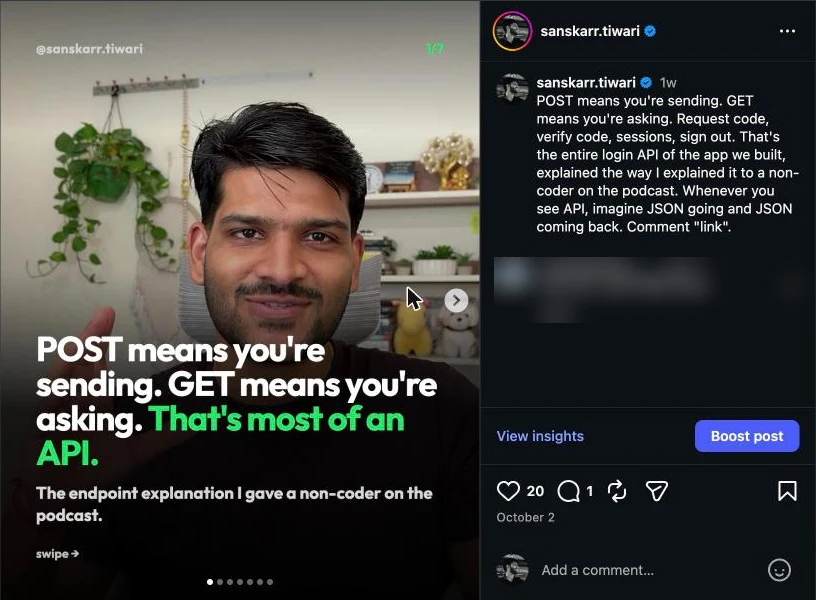
Ignore likes for now. Likes are cheap and mostly come from followers who would have liked anything you posted. The two numbers that predict ad performance are:
- Saves. Someone thought the post was useful enough to come back to. That's the strongest signal a carousel has real value.
- Shares. Someone sent it to another person. That means it works on people who don't already follow you, which is exactly who your ad will reach.
Here's the insights screen for one of our own carousels, a week after posting:
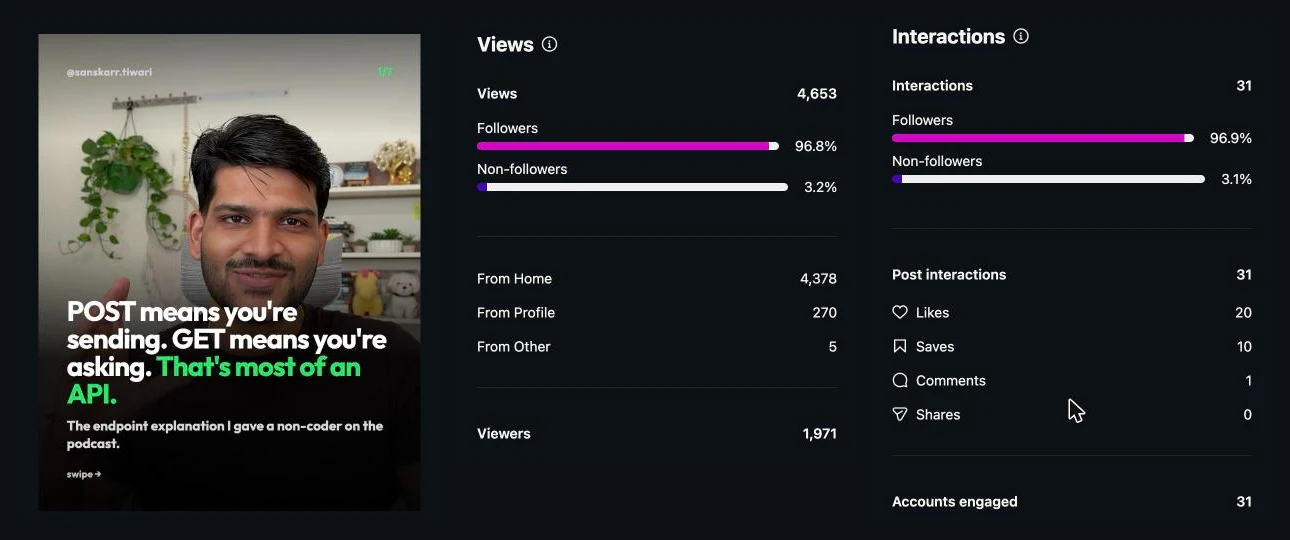
This is a post we wouldn't boost yet. It reached 1,971 accounts, but 96.8% of the views came from people who already follow us. It got 10 saves and zero shares, so the save rate is about 0.5% and there's no sign it spreads to new people. Fine for the feed, weak as an ad.
Raw counts are misleading because a post that reached 20,000 people will always have more saves than one that reached 2,000. Divide by reach instead:
- Save rate = saves ÷ accounts reached
- Share rate = shares ÷ accounts reached
When you compare carousels this way, the one with the most reach is often not the one to promote. Save rates above 2–3% and share rates above 1% are a good sign on most accounts, but compare against your own average rather than a universal benchmark.
Also check the non-follower share (like the 3.2% above) and profile visits. A carousel that already reached beyond your followers and sent people to your profile is the best bet for a traffic or sales ad.
Step 2: Check that it works as an ad
A carousel that does well organically can still fall flat as an ad. Go through it slide by slide with fresh eyes:
- Slide 1 must make sense to a stranger. Followers know who you are. A cold audience sees one image among many. If the first slide relies on context ("Part 3!"), it won't work.
- The last slide needs a next step. Organic carousels often end with "Save this for later." For an ad, the last slide should point somewhere: your shop, a free guide, a booking page.
- Text should be legible on a small screen. Ads also appear in placements where the image is shown smaller. If you have to squint, cut words.
If the carousel needs edits, you lose the existing likes and comments, because you'll be uploading a new version. Sometimes that's worth it. A clear first slide matters more than social proof. If you rebuild it, keep it at 1080 × 1350 so it takes up the most room in the feed (the carousel size guide covers the exact dimensions and the grid crop).
Step 3: Boost button or Ads Manager
There are two main ways to promote the post, with very different amounts of control.
The Boost button is under the post in the Instagram app (and on desktop). You pick a goal, an audience, a daily budget and a duration. It takes two minutes. The goals on offer right now are visit your profile, visit your website, message you, and a newer "mix of actions" option:
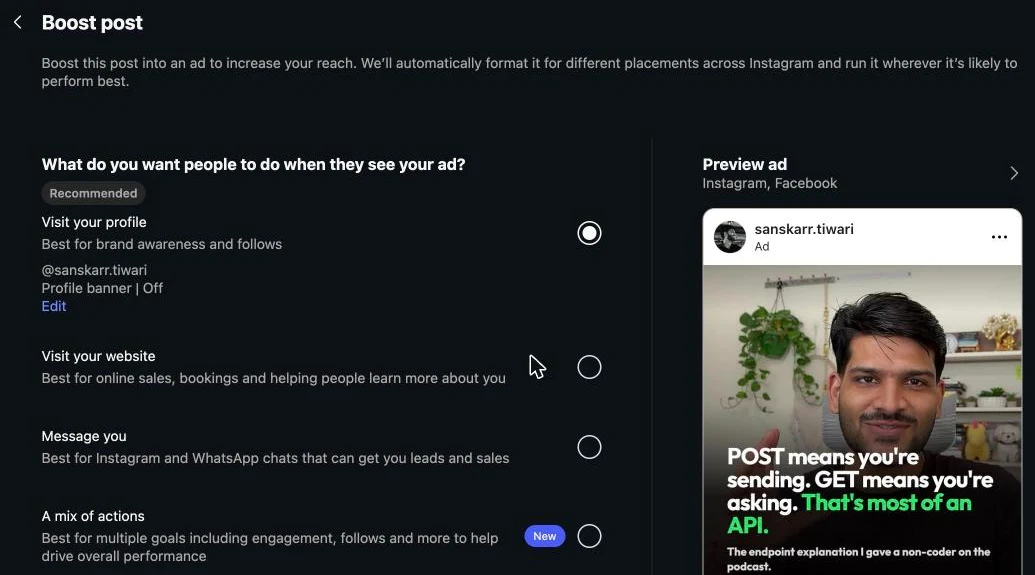
The trade-offs are fewer objectives, simpler targeting and less detailed reporting. It's fine for a first test.
Ads Manager is Meta's full tool on desktop. You create a campaign and choose an objective such as Traffic, Engagement, Leads or Sales.
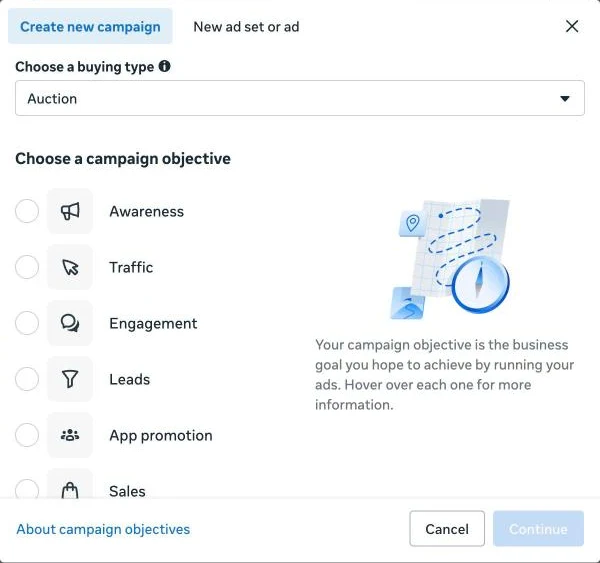
Then, at the ad level, choose Use existing post to pick your carousel. You get full control over placements, budget type, scheduling and conversion tracking with the Meta pixel. It takes longer and the interface is cluttered. Still, if you plan to spend more than a small test budget, or you want to measure sales, it's the better route.
A practical rule: boost when you want reach and engagement on a winning post and don't need conversion tracking. Use Ads Manager when the ad has to drive a measurable action on your website.
There's also a third option if neither the phone app nor Ads Manager appeals to you. You can connect your ad account to an AI assistant and boost it straight from a Claude chat by describing what you want, for example "promote my carousel about ad mistakes to people in Mumbai interested in small business, ₹500 a day for 5 days." Tools like this set the campaign up paused so you can review it before anything spends. Whichever route you pick, the steps below about audience, budget and measurement are the same.
Step 4: Choose the audience
You'll usually see three options. In the Boost flow the default is "People similar to your followers", with "Create your own" underneath for manual targeting:
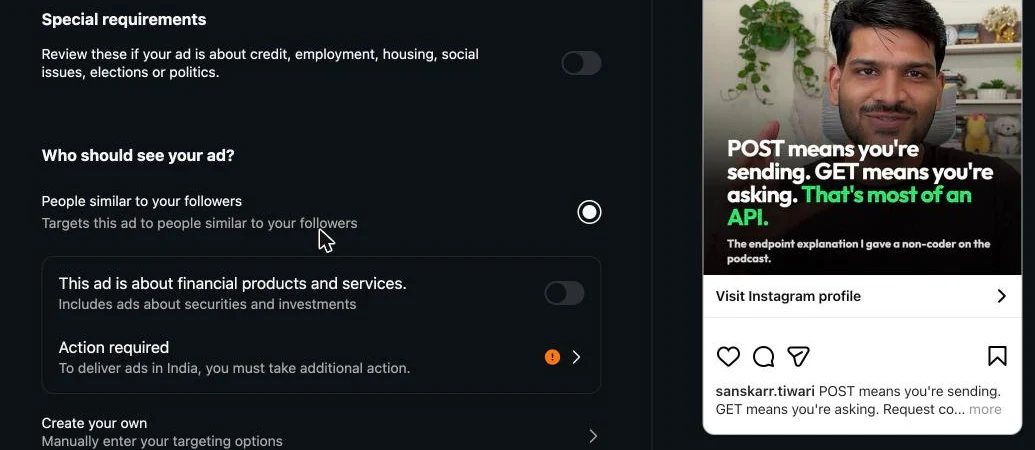
- Automatic audience (Advantage+ in Ads Manager). Meta finds people similar to your followers and people likely to engage. For a post that already performed well, this is often the best starting point because Meta has real engagement data on it.
- Your own audience. Location, age range, gender and interests. Use this when your business is local (a salon only serves one city) or your product only fits a clear age band.
- Retargeting. People who engaged with your Instagram account or visited your website in the last 30–90 days. This is small but warm, and works well for a carousel that ends with an offer.
A few audience tips that save money:
- Don't stack too many interests. Five tightly related interests beat twenty loose ones. Very narrow audiences get expensive fast.
- Set location carefully. "People living in this location" is usually what you want. "People recently in this location" includes tourists.
- Keep it simple at first. Run one audience per test. If you change the audience, the budget and the creative at the same time, you won't know which change made the difference.
Step 5: Set a test budget
You don't need a big budget to learn whether a carousel works as an ad. A reasonable first test is:
- ₹300–₹500 per day (or about $5–$10 if you're outside India)
- For 5 to 7 days
- On one carousel and one audience
That's roughly ₹1,500–₹3,500 for the whole test. It's enough for Meta's delivery system to settle and for you to see a pattern, without risking much if the post doesn't convert.
Watch the defaults. When we opened the Boost screen for the carousel above, Instagram suggested ₹584 a day and set the duration to "Runs until paused":
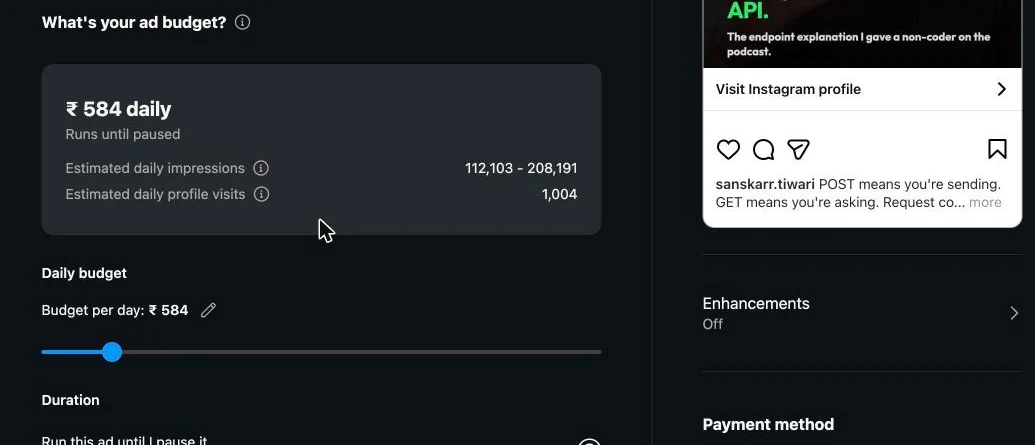
Lower the daily budget to your test amount and set an end date before you confirm. An ad that runs until you remember to pause it is how a small test turns into a big bill.
Two more settings worth knowing:
- Daily budget vs lifetime budget. A daily budget is easier to adjust. A lifetime budget lets Meta spend more on good days and less on bad ones. For a first test, daily is simpler.
- Set an account spending limit. In Ads Manager under Billing, you can cap total spend. It's a safety net in case you forget a campaign is running.
Don't edit the ad for the first two or three days. Big changes restart Meta's learning phase, and early numbers are noisy anyway.
Step 6: Measure what matters
Once the ad has run for a few days, open the results. Here's what to look at, in order of importance:
| Metric | What it tells you | Rough good sign |
|---|---|---|
| Cost per result | What you're paying for the action you chose (visit, message, lead, sale) | Lower than what that action is worth to you |
| Link click-through rate (CTR) | How many people who saw it clicked through | Above 1% for a traffic ad |
| Cost per 1,000 impressions (CPM) | How expensive it is to reach this audience | Compare between audiences, not to other people's numbers |
| Frequency | Average number of times each person saw it | Under 2–3 for a short test |
| Saves and shares on the ad | Whether strangers react the way followers did | Any meaningful number is a good sign |
How to act on the results:
- CTR is good but sales are low. The ad works; your landing page doesn't. Fix the page before spending more.
- CTR is low. The first slide isn't stopping people. Test a version with a stronger hook or a clearer image.
- CPM is very high. The audience is too narrow or very competitive. Widen it.
- Frequency is climbing above 3–4. People are seeing it too often. Increase the audience or rotate in a new carousel.
If the test works, raise the budget gradually, by around 20–30% every few days. Doubling it overnight often pushes cost per result up.
Getting more out of the same carousel
If a carousel worked organically and then worked again as a paid ad, you've found a message people actually want. Don't leave it at one post:
- Make variations. Keep the same idea but try a different first slide. That's the cheapest way to find an even better ad.
- Turn it into a presentation. The same structure of hook, points and conclusion works as a sales deck or a webinar. You can repurpose the same carousel into a pitch deck instead of starting from a blank slide.
- Build the next one on the same topic. If "5 mistakes" worked, "5 more mistakes" or "what to do instead" probably will too. The carousel maker can draft one from your notes or a video so you're not designing every slide by hand.
Quick checklist
- Rank recent carousels by save rate and share rate, not likes.
- Make sure slide 1 works for a stranger and the last slide has a next step.
- Boost for a quick test, use Ads Manager when you need conversion tracking.
- Test at ₹300–₹500 a day for 5–7 days, then judge on cost per result, CTR and frequency.
Ready to create your own carousel?
Turn any content into professional Instagram carousels in seconds.
Start Creating — It's Free